
Trong dự án nhiều khi chúng ta muốn lấy bản ghi cuối cùng trong 1 table nào đó.
Để giải quyết vấn đề này chúng ta có thể sử dụng hàm latest() hoặc orderBy() trong Laravel 6+.
Mình sẽ demo 3 cách lấy bản ghi cuối cùng trong table ở các ví dụ bên dưới nhé.
Đầu tiên mình sẽ tạo một table items có các dữ liệu demo như bên dưới.
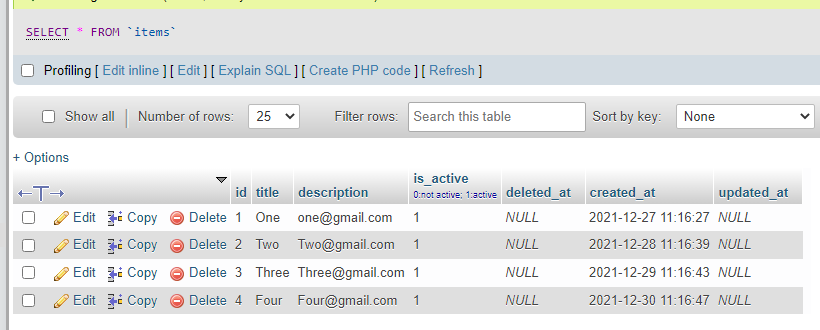
Using latest() belong to created_at field:
Khi sử dụng latest() mặc định nó sẽ lấy bản ghi cuối cùng dựa vào trường created_at trong table items.
Thêm code vào controller như bên dưới.
appHttpControllersItemController.php
<?phpnamespaceAppHttpControllers;useAppModelsItem;classItemControllerextendsController{/**
     * Display a listing of the resource.
     *
     * @return IlluminateHttpResponse
     */publicfunctionindex(){$last_record=Item::latest()->first()->toArray();dd($last_record);}}
Output:
array:7 [▼
  "id" => 4
  "title" => "Four"
  "description" => "[email protected]"
  "is_active" => 1
  "deleted_at" => null
  "created_at" => "2021-12-30T11:16:47.000000Z"
  "updated_at" => null
]
Using orderBy() belong to id field:
appHttpControllersItemController.php
<?phpnamespaceAppHttpControllers;useAppModelsItem;classItemControllerextendsController{/**
     * Display a listing of the resource.
     *
     * @return IlluminateHttpResponse
     */publicfunctionindex(){$last_record=Item::orderBy('id','DESC')->first()->toArray();dd($last_record);}}
Output:
array:7 [▼
  "id" => 4
  "title" => "Four"
  "description" => "[email protected]"
  "is_active" => 1
  "deleted_at" => null
  "created_at" => "2021-12-30T11:16:47.000000Z"
  "updated_at" => null
]
Using latest() belong to id field:
appHttpControllersItemController.php
<?phpnamespaceAppHttpControllers;useAppModelsItem;classItemControllerextendsController{/**
     * Display a listing of the resource.
     *
     * @return IlluminateHttpResponse
     */publicfunctionindex(){$last_record=Item::latest('id')->first()->toArray();dd($last_record);}}
Output:
array:7 [▼
  "id" => 4
  "title" => "Four"
  "description" => "[email protected]"
  "is_active" => 1
  "deleted_at" => null
  "created_at" => "2021-12-30T11:16:47.000000Z"
  "updated_at" => null
]
Hy vọng bài viết này sẽ giúp ích cho các bạn!
Nguồn: viblo.asia