
Use TensorBoard for visualization experiment result in machine learning

Prepare development environment: Python 3.9.6 ; pip 21.1.3 ; jupyter-notebook 6.4.0 ; tensorflow 2.5.0 . If you run by command line Create file tensorboard_pytorch.py from torch.utils.tensorboard import SummaryWriter writer = SummaryWriter()for x inrange(5): y =100* x writer.add_scalar('y', y, x) writer.close() (c1) Result is Use your web browser, go to address http://localhost:6006 to see the result
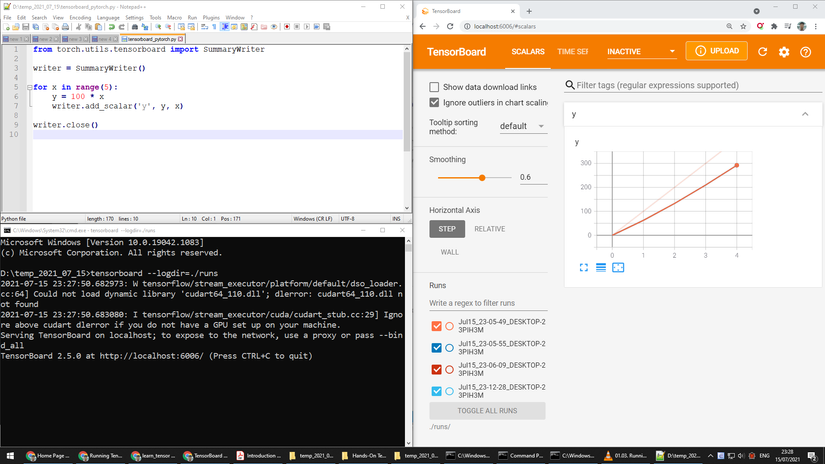
Prepare development environment: Python 3.9.6 ; pip 21.1.3 ; jupyter-notebook 6.4.0 ; tensorflow 2.5.0 .

If you run by command line

Create file tensorboard_pytorch.py

from torch.utils.tensorboard import SummaryWriter

writer = SummaryWriter()for x inrange(5):
    y =100* x
    writer.add_scalar('y', y, x)

writer.close()

(c1)

Result is

Use your web browser, go to address http://localhost:6006 to see the result

If you run by jupyter notebook

Create a new jupyter notebook

pin install jupyter
jupyter notebook

Code block is the same, the content is

from torch.utils.tensorboard import SummaryWriter

writer = SummaryWriter()for x inrange(5):
    y =100* x
    writer.add_scalar('y', y, x)

writer.close()

(c1)

Load extension TensorBoard by

%load_ext tensorboard

Visualize the result of code snippet (c1) by

%tensorboard --logdir ./runs/

Result is

SummaryWriter methods are:

  • add_scalar
  • add_scalars
  • add_custom_scalars
  • add_historgram
  • add_image
  • add_images
  • add_figure
  • add_video
  • add_audio
  • add_text

Nguồn: viblo.asia

Bài viết liên quan

Hướng Dẫn Đưa Bài Viết Lên Google AI Overviews Năm 2026 (Chuẩn SEO)

Tối ưu hóa cho AI Overviews (Tính năng tổng quan bằng AI của Google) là quá trình c

Có gì mới trong WordPress 7.0? Góc nhìn từ một thành viên cộng đồng

Những điểm nhấn quan trọng Chuẩn hóa tích hợp AI: WordPress® 7.0 ra mắt một khun

Cấu hình Prisma v7 Với Nest.js Mới nhất

Setup Prisma v7 trong Nest.js Bài viết dành cho ai mới học Nest.js và chọn prisma làm OR

Tấn Công Ứng Dụng Web: Mối Đe Dọa Hàng Đầu – Phần 2

viết lại nội dung này ” Phát hiện các cuộc tấn công Cross Site Scripting (XSS)